
Trades and P&L
Read the Trades table on a Connection or Account page, open a Trade's detail and see where P&L comes from.
Every Connection page and every Account page ends with a Trades table. On a Connection, each row is one of the Master's Trades and what every Receiver did with it. On an Account, each row is one Trade on that Account.
The Trades table
All, Open and Closed above the table pick which Trades show, and the search icon finds Trades by symbol, side, step, Receiver or outcome.
On a Connection's page, the columns are:
| Column | What it shows |
|---|---|
| Symbol | The Master's symbol. |
| Direction | Long or short. |
| Size | The Trade's size now, or a dash once it closed. |
| Opened and Closed | When the Master opened and closed the Trade, in UTC. |
| State | Open or Closed. |
| P&L | The Trade's P&L. |
| Copy | The outcome of each Receiver's copy of this Trade. |
Copy shows each outcome, such as Replicated. A Capped badge beside it means a copy was placed at the Receiver's maximum size for the symbol.
On an Account's page, the table shows Instrument, Side, Size, State, P&L and Copy the same way, then:
- Events: how many steps the Trade has.
- Activity: when the Trade last changed, in UTC.
Load more at the bottom of the page fetches older Trades.
A Trade's detail
Select the arrow at the start of a row to open the Trade's detail inside the table, and select it again to close it.
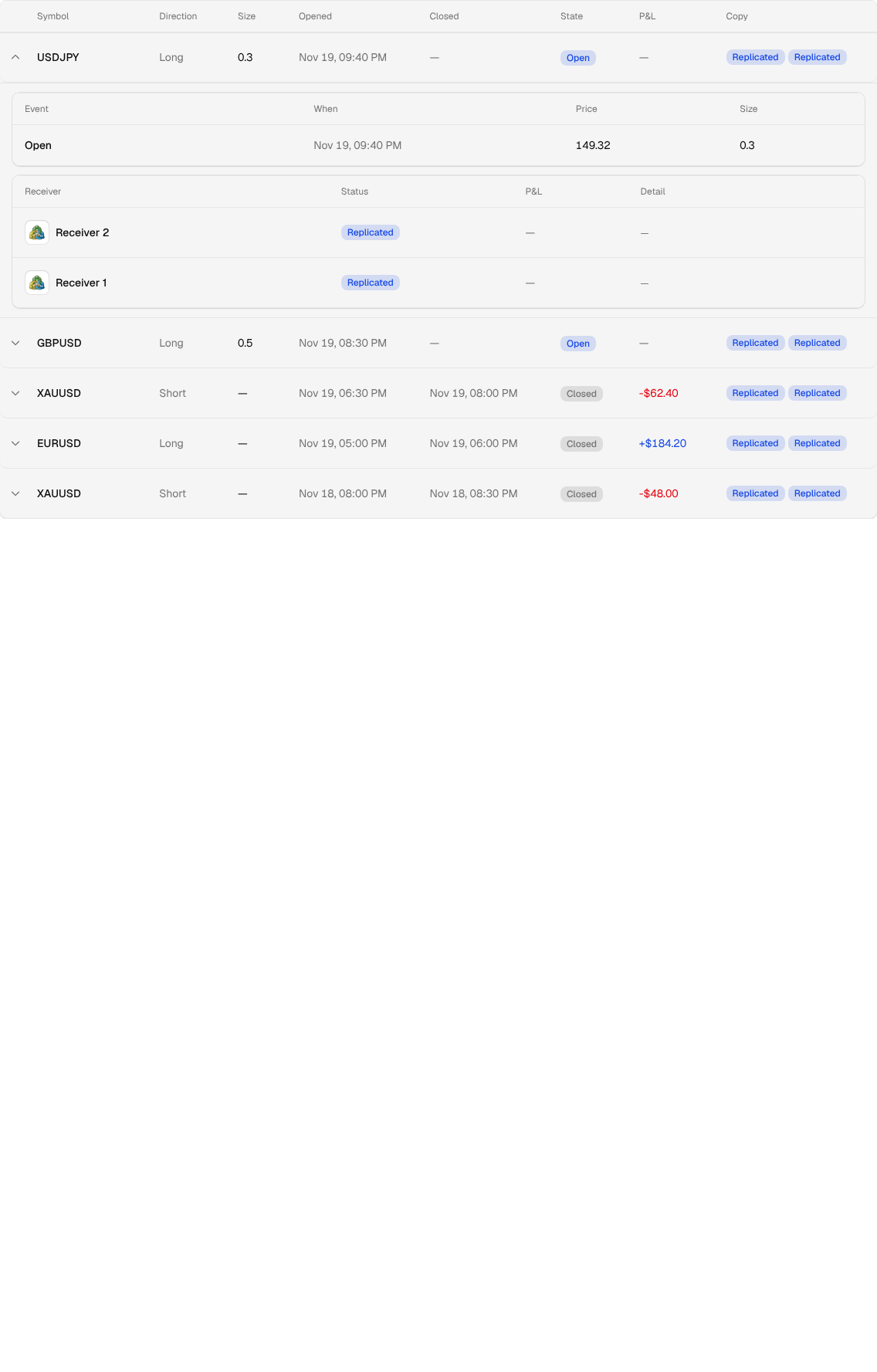
The first table lists the Trade's events, oldest first:
- Event: the step, such as
Open,Size Up,Partial Close,SL Set,SL Moved,TP Removed,SL Hit,TP HitorClose. - When: the time of the step, in UTC.
- Price and Size: the price and size the step carried, or a dash when it has none.
The second table lists every Receiver the Trade was copied to:
- Receiver: the Receiver Account and its Trading Platform.
- Status: the copy's outcome, Replicated, Partial, Failed, Diverged or Skipped.
- P&L: what the copy made or lost on that Receiver.
- Detail: why a copy was skipped or only partly copied, such as "Entry below this Account's min size for the symbol" or "Size change below this Account's min size; size kept".
Troubleshooting explains each outcome and what to do about it.
Where P&L comes from
P&L comes from your Trading Platforms: MyTradesConnect reads the profit or loss each platform reports for every Trade and adds them up.
- Open P&L: the platform's profit or loss on a Trade that is still open.
- Realized P&L: a closed Trade's net result, with swap, commission and fees included.
- Today's P&L: the Realized P&L of Trades closed in the current New York day. Open Trades do not count.
Every figure is in the Account's own currency. When your Accounts hold more than one currency, a total shows one figure per currency, because MyTradesConnect never converts between them. Profits and losses each show in their own color.
P&L updates live while the page is open: a close on a Receiver shows in Today's P&L within moments, on every page at once.
P&L shows only for Accounts in an active Connection. When you pause a Connection, its figures leave the totals instead of freezing at their last value.